
Steps to add a REACTIVAM2M to M2M devices in the management platform (https://m2mservices.com/Admin)
These steps work for all M2M products requiring reactivation to add their corresponding subscription.
If the device is already suspended and its PREPAY END DATE time has passed on the platform, this option will be shown (ACTIVATE DEVICE).

We first have to look for the communicator, double click it, and enter its start tab.

To activate it, we have to click on (ACTIVATE DEVICE).

It will ask us if we wish to reactivate the device; click Yes.

This screen will pop up; click on (voucher).

Enter your voucher number for reactivation (you can find it on your invoice).

You can find the 15-digit number (Voucher number) in your invoice.
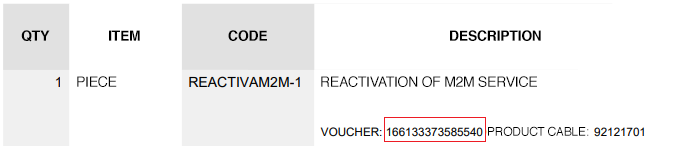
Enter your voucher number and click (save).

How can we verify if we activated our device correctly? The ACTIVATE DEVICE has disappeared, indicating we did it correctly.

NOTE
It is important to place the subscription voucher as soon as possible, the reactivate only gives you until the end of the current month to enter your subscription. If the subscription is not placed, the device will remain suspended and you will have to purchase another REACTIVAM2M subscription.